
This is where we tell scripting to put glass in the portal. It can be
an independent script but
usually you'll want to set it up as one of the Actions at the
start of the level.
First go into 'Then Perform New Action' and either 'Insert a New Action'
or 'Replace with a Different Action' as shown below. I've tried
both 'Enable/Disable'
and 'Toggle' force field and found no difference. It's important
to use double face and set it to true.
This way you only have to do it to one side of the portal.
To get to the specifics open for the action pick the plus and the branch will open below.
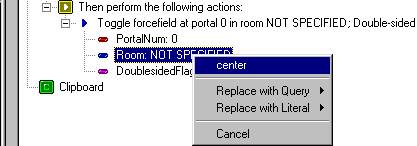 |
Right-click on Portalum, pick Enter Integer Value and give
it the value of 0.
(look at step 1 for how verify portal number). Next, right-click Room to specify which room's portal we're referring
to.
Set DoublesidedFlag to TRUE |
Your glass is now in place and your ready for Step 3