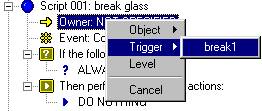
Right-click Owner, go to Trigger and you get a list of all the trggers in your level. When you change Owner to a trigger, event automaticly changes to 'Activated (by IT).
Start a new script and name it.
|
First we set the owner of the script to the trigger.
Right-click Owner, go to Trigger and you get a list of all the trggers in your level. When you change Owner to a trigger, event automaticly changes to 'Activated (by IT). |
We only want our glass to break under certain conditions. In this
case it's going to be that:
1) It's a player's weapon.
2) It's NOT an energy weapon.
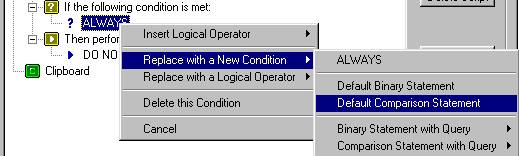 |
First we change Always to a comparison statement. We're comparing whether or not IT is a player's weapon. |
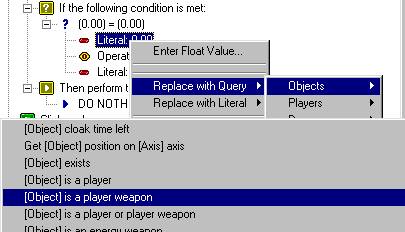 |
Right-click on Literal and follow the diagram to the left
to have the script check if IT is a player weapon.
The word Literial changes to Bool. Change the Bool after Operation to True. (right-click then TRUE) The results is (IT is a player weapon) = (TRUE). |
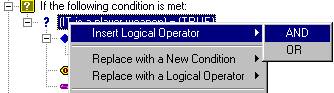 |
Right now the glass would break if any player wepon hit
it.
We want only non-energy weapons (vauss, concusion missle, etc..) to break it. Right-click on (IT is a player.....) and insert the AND operator. |
Below you see how the AND comes in and the two conditions that have
to exist to satify the AND are listed below.
You could have put the AND in before starting to list the conditions.
There would have simply would have been two ALWAYS statements available
to change. If you want a third condition to test for you just keep
anding AND or OR in place of a cindiondition and it keeps branching out.
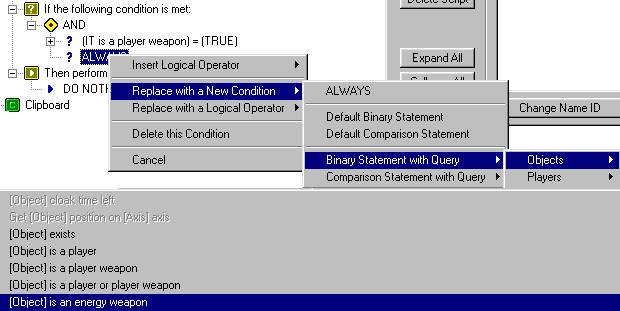
Change the remaining Always to the Binary Statement with Query '(Object)
is an energy weapon' as shown above.
Set the 'Operation: is' to FALSE.
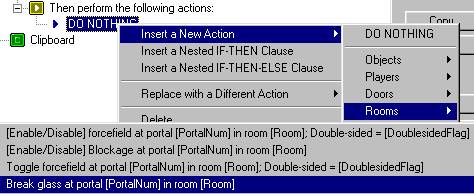 |
All that's left is to break the glass.
Follow the diagram to the left then set tthe [PortalNum] and [Room] the same way you did to Toggle the forcefield in step 2. Your 2 scripts should now look like what I have below. Save it. Compile it. |
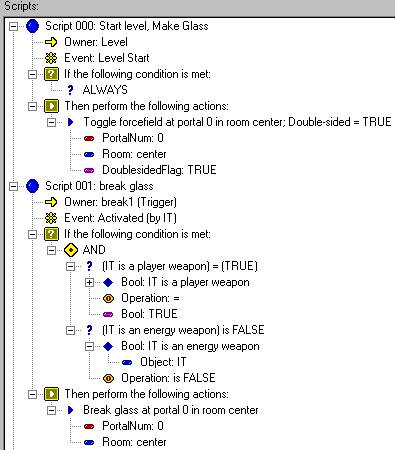
Congradulations. You now have breakable glass in your level.