Custom Weapons  A Simple Primary Weapon    [ BACK]  [MAIN] [NEXT]
 
For our primary weapon we'll replace the Plasma Cannon (weapon name: Plasma) with a SlingShot  Ok, so it's cheesy.   I thought I'd spend time on the tutorial instead of fancy graphics ;).  I've zipped the files into slngshot.zip so you could try it out when you're done going through this page.

When the slingshot is fired you'll the Slingrock instead of the plasma blob.  It will be set to bounce 3 times before exploding on a wall impact.  On a wall impact it will spawn another weapon, the SlingParticle.  Actually I'll have it spawn 3 SlingParticles.  The SlingParticles will be set to bounce 4 times before exploding on a wall impact or die in 2.5 seconds.

Here's the five objects I created for this weapon:
PowerUp
Object
Fire Image
Object
Fire Image Object 
For Spawn
Hud Image
For CockPit
Hud Image
Without CockPit
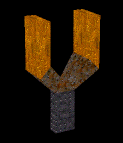
Slingshot.oof
Seen in place of the plasma cannon model as the powerup
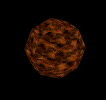
Slingrock.oof
The Fire Image seen shooting from the ship
SlingParticle.oof
FireImage for the Spawned weapon
slinghud.ogf
64x64 ogf
For Hud Image of weapon in a cockpit
slinghudICON.ogf
32x32 ogf
For Hud image of weapon without cockpit

We'll need to set up 4 .gam pages

Generic Object: Plasmacannon:  The power up.
Weapon: Plasma:  The weapon we're replacing
Texture: slinghudICON1:  A texture page for the 32x32 hud image
Weapon: slingparticle: The weapon to spawned.  Note! Since we don't fire it from the ship
it can be an original .gam name.


Generic Object: Plasmacannon
We need to change the plasmacannon power up page to use our .oof

I put in slingshot.oof as the filename.  Make sure you delete the medium file name and the low file name.

Now we'll see a slingshot floating around where a plasmacannon powerup was.

Technically it will still be an energy weapon for now so there's no need for ammo.


Weapon: Plasma   (I've removed setting that were blank to reduce the size of the graphics)
I'm only going to point out what matters to this weapon:

1) Set Hud image to use slinghud.ogf.  Note: this is the actual ogf file, not a "Texture".
2) Set Fire Image to slingrock.oof.
3) Removed the Particle Name so there's no trailing sparks. you'll see only the slingrock.oof
4) Left Planar Blast on.
5) Turn on Spawns on impact
6) Set Spawn name to slingparticle.  When it ends on a wall hit, 3 slingparticles will be spawned.  Note: I specify the Weapon.gam name, not the .oof file

7) Set Spawn Count to 3. You'll see 3 slingparticles will shoot (spawn) from the explosion when it impacts a wall.


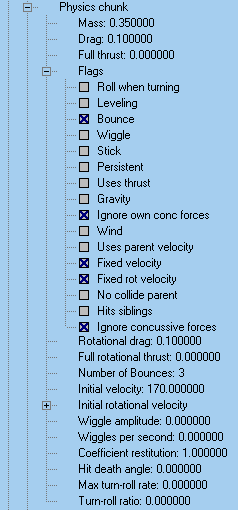
8) Bounce:  The slingrock will bounce off walls a certain amount of timess before exploding on a wall hit.


9) Fixed Velocity:  Speed will stay constant..

10) Fixed rot Velocity:  Speed of rotation never changes


11) Number of Bounces: It will bounce off walls 3 time. On the 4th wall hit it will explode.

12) Initial velocity:  The speed it leaves the at.  Since Fixed Velocity is on, it will maitain this speed.


13) Increased the Explode Time to 10.4 for 3 reasons. First so you can see how a 'Planar Blast' stayes planar to a wall..  Second, how the time keeps the explosion image visible.  Third, how setting the Expand flag makes the explosion image expand. 


I'll address the Lighting chunk when we do a Secondary weapon.
 

14) Changed the Icon name to use my Texture.gam slinghudICON1 which refers to my 32x32 texture, slingICON.ogf.  You'll see this if you use Hud without cockpit.


Weapon: slingParticle
1) Changed Fire image to SlingParticle.oof

2) Deleted the Particle name.  Without the particles, the streamers are really obvious.
 
3)  Turned on Streamer.  To the right you can see a streak trailing behind the fire image- that's a Streamer
4) Left on Planar Blast.  Note: the green blast shown  above/right is the explosion from the Plasma, not the slingparticle.
5) Left Spawns on impact and Spawns on timeout off so no more weapons would continue to be created.


Note: Spawn Name doesn't matter because none of the Spawn flags are on.


7) Although I didn't open the Physics chunk for you to see inside it the Bounce flag is on and Number of Bounces set to 4.


6) Set Lifetime to 2.5 so you had time to see them bounce.


Texture: slinghudICON1
Finally, to get the little slingshot show up on the HUD without cockpit you have to make an actually "Texture" by creating a texture.gam page.

1) Specify the File name to be slinghudICON.ogf  (my 32x32 .ogf) 

There was no need to set up anything else.


That's it.  I zipped up the files you'll need and put them in slngshot.zip.  Try it out by  putting  the .gam file and the 5 objects into any level that has a plasma cannon.  Remember to change slngshot.gam to match the name of the .mn3 you put it in.  If the mission already has it's own .gam copy the 4 pages from slngshot.gam into the mission's .gam. 

That's it for now.   Have Fun!

[ BACK]  [MAIN]  [NEXT]