| JUST A FEW OF OOFEDITOR'S FEATURES |
![]() |
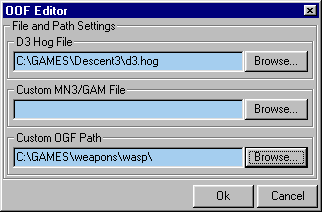
Once you tell OOFEDITOR where the D3.hog is it
not only displays your objects with D3 textures, you can access any oof
from the D3hog to view, play it's animation, or export.
Set up an MN3 with custom texutres and a gam file and OOFEDITOR can display your oof using those textures and access custom oofs from within the MN3 Or point to folder containing the OGF's to make them available to OOFEDITOR |
| Prepare to animate your oof by setting up the Sub-Model
hierarchy quick and easy. Just drag-n-drop the 'Child' onto the intended
'Parent' You can do this in the 'Model/Sub-Model Selector/Viewer"
or right inside the display.
Highlights make it easy to tell what your doing. The selected 'Child' is purple. The potential 'Parent' is green. |
![]() |
![]() |
You Can copy keys of a Sub-Model
from one frame to another.
You can even copy all the keys of a Sub-Model at once and paste them into another oof. Turn on View Rotator Animation to check rotate property setting. View Trajectories show you the path a Sub-Model traveles in a frame. |
![]() |
| Above is the Animation Controls toolbar. Set Time Congiuration for the frames you want to play, Animation Length for the amount of time and hit the Play button. You'll also use Time Configuration to add frames. The key indicator tells you whether or not the selected Sub-Model has an animation key in that frame and is also used in the Copy/Paste process. |
![]() |
Glows are just one-face sub-models with the glow property
assigned.
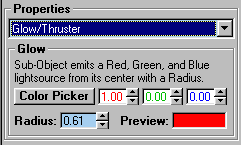
Pick the sub-model and choose Glow/Thruster from the list of properties. You can set the color by adjusting the RGB or use the Color Picker to choose from a color pallet. Use the Radius spinner to set the size |
![]() |
| [ BACK ] |